A location is created/existing location project is completed by setting Project Status to “Open” on the Project level. This is done by changing the Project Status and entering a Store Number, if applicable per below steps:
| Step | Action |
|---|---|
| 1. |
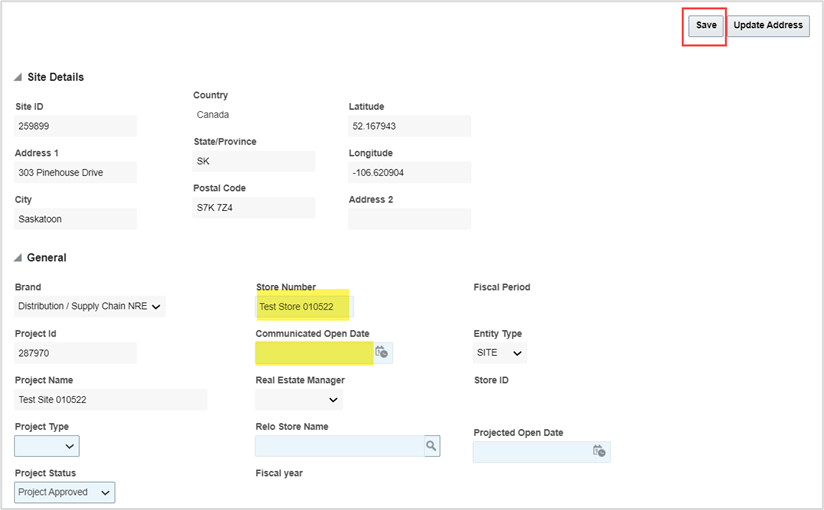
Click the General tab, navigate to the General pane and complete the following fields:
|
| 2. | Click Save. |
| 3. |
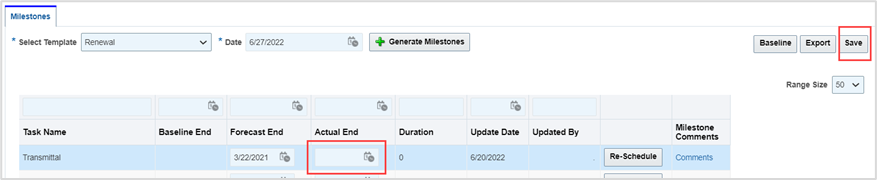
Click the Milestones tab.
|
| 4. |
Enter the Actual open date, then click Save. A location record is created.
|

Was this article helpful?
That’s Great!
Thank you for your feedback
Sorry! We couldn't be helpful
Thank you for your feedback
Feedback sent
We appreciate your effort and will try to fix the article