Introduction
When dispatching a Service Request, you can now choose to schedule dispatch for a future date and time rather than dispatching immediately. When a future dispatch is scheduled, the system delays Work Order creation, vendor/provider notifications, and SLA initiation until the selected date and time, giving you more control over when work is formally assigned and kicked off.
This is useful when:
- The issue is non-urgent and you want to align dispatch with vendor availability or planned site access
- The work is related to a future event and you want to schedule accordingly
- You're coordinating work across multiple locations and want to stagger scheduling
- Operational timing (e.g., after-hours, weekend access windows) makes immediate dispatch impractical
Availability
The Dispatch Timing functionality is available on all Service Request screens within the Tango Maintenance Edge platform:
- Manager Service Request (Facility Manager, Maintenance Lead, Maintenance Technician)
- Distributed Call Center
- Call Center
- (Related Work Order coming soon)
How It Works
On the Dispatch Step, after selecting your service provider and reaching the Dispatch step (Step 3) of the Service Request, you will see a new Dispatch Timing dropdown field:
| Dispatch Timing Value | Behavior |
|---|---|
| Immediate (default) | Dispatches now. This is the same behavior as before this enhancement |
| Scheduled | Delays dispatch to a future date and time you specify |
Immediate is the default value, so no action is needed if you want to dispatch right away. Existing process/workflows are unchanged.
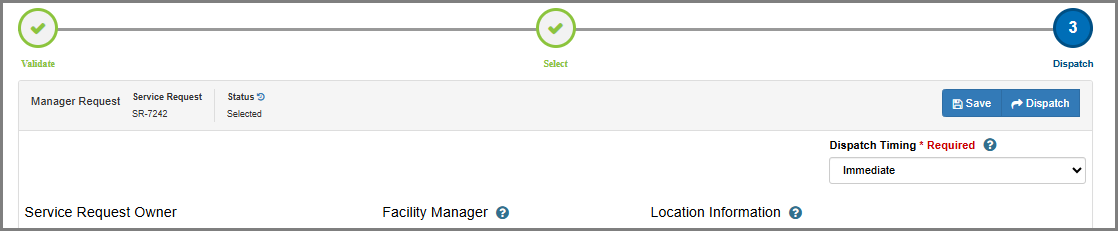
Scheduling a Future Dispatch
On the Dispatch step, change Dispatch Timing from Immediate to Scheduled.
- A required Dispatch Date/Time field will appear. Select the future date and time when the system should dispatch the request.
- Past dates are not allowed.
- Click Dispatch. The Service Request will move to Pending Dispatch status and remain there until the scheduled date and time.

While in Pending Dispatch status:
- No Work Order is created
- No notifications are sent to the vendor or provider
- The SLA timer does not start
- The Dispatch Date/Time field remains editable. You can update the scheduled time if plans change.
- Note: You can set the date/time to the current date and time to Dispatch the Request right away (there is a scheduled event that processes the Pending Dispatch Requests so there could be a few minute delay)
- The rest of the Service Request is read-only (You are able to create Related Work Orders)
- No action is required from you at the scheduled time.

Pending Dispatch Service Requests Tile
A new Pending Dispatch Service Requests tile has been added to your home page. Use this tile to monitor and manage any Service Requests you have scheduled for future dispatch.
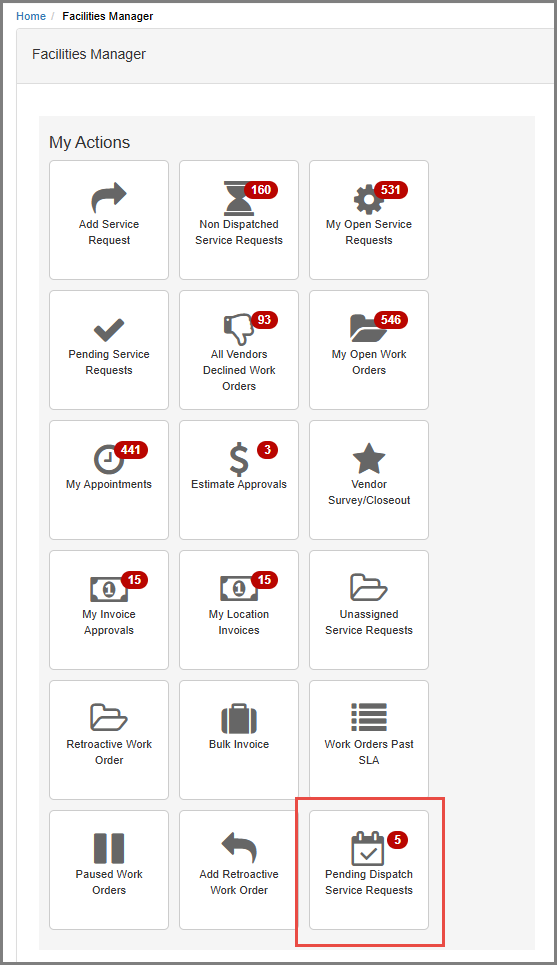
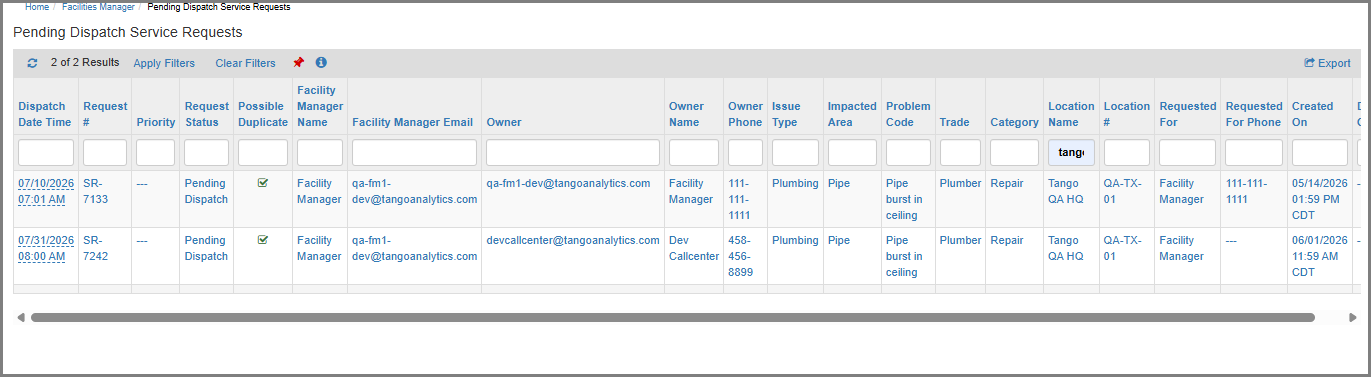
The tile includes a badge count showing how many requests are currently pending dispatch. Opening the tile displays a report with:
- Dispatch Date/Time (editable directly in the report, useful for quickly rescheduling)
- Standard Service Request details
Tip: The report is sorted by Dispatch Date/Time ascending by default, so the next scheduled dispatch is always at the top.
Note: The report is filtered similarly to the Non Dispatched Service Request tile, so any Requests your user is assigned to as the Facility Manager or any Requests for a Location to which you are associated in Edge.
Important Notes & Limitations
- Auto Dispatch is not affected. Problem Codes configured for Auto Dispatch fire immediately when triggered, they cannot be scheduled. This feature applies only to manual dispatch by FM, ML, and MT, CC, DCC users.
- Related Work Orders are not in scope for scheduled dispatch at this time.
- Time zones: The Dispatch Date/Time follows existing system time zone behavior, no changes have been made to time zone handling.
- Notifications: No new notification types have been added. Existing dispatch notifications fire at the scheduled dispatch time, not at SR submission time.
Roles with Access
| Role | Access |
|---|---|
| Facility Manager (FM) | ✓ |
| Maintenance Lead (ML) | ✓ |
| Maintenance Technician (MT) | ✓ |
| Distributed Call Center (DCC) | ✓ |
| Call Center (CC) | ✓ |
| Related Work Order | Coming soon! |
Was this article helpful?
That’s Great!
Thank you for your feedback
Sorry! We couldn't be helpful
Thank you for your feedback
Feedback sent
We appreciate your effort and will try to fix the article