Table of Contents
Understanding Leases
The Tango integrated solution effectively manages the entire life cycle of real estate and equipment leases. The lease is the basis for invoices, vouchers and receipts or payments for recurring rent and operating expenses for that lease. Hence, you create a lease to enable processing for such financial transactions required by the lease.
The system allows for you to perform cost allocations, rent escalations, and capacity planning for your organization, and establish critical date alerts to notify you when you must take action on or make a decision about any particular lease.
Prerequisites
Before creating leases, you must:
Set up a Location record
Set up Assets and Equipment details under the Location record
Determine the Lease Asset Type
Determine the Tenancy Type
Determine the Currency Denomination
Setting Up a Location Site
Mapping
From the Functional Dashboard, click the Mapping icon. The Mapping module visually displays data besides supporting key creation procedures and reporting capabilities. All entities, excluding Leases, begin or are created within the Maps module.
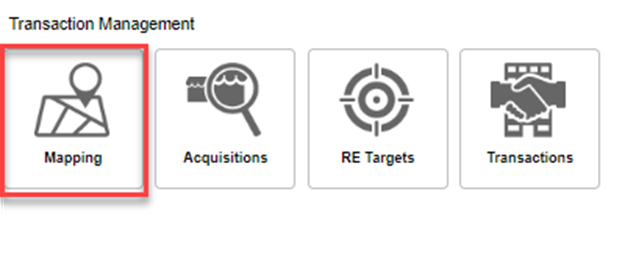
For more details on Mapping navigation, refer to the Tango Platform – Mapping & Locations Guide.
Locations
Tango is a location centric system. The location information is the base of all other records. A location can represent a building, a strip center, a mall, or any definition based on your company.
You can navigate to locations using the mapping module or directly in the Locations module. To navigate to the locations, click on the Locations module on the Functional Dashboard.
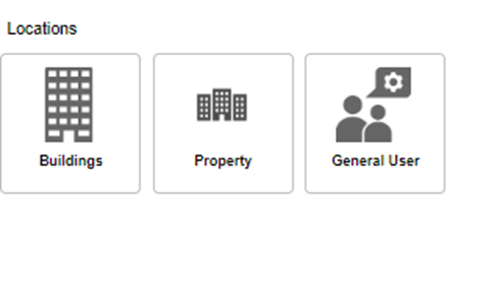
For more details on Location setup and navigation, refer to the Tango Platform – Mapping & Locations Guide.
Lease Asset Type
In the Tango solution leases can be divided into two categorizations or types of assets: Real Estate leases and Non-Real Estate leases.
Real Estate Leases
Real Estate Leases enable you to securely manage the life cycle of corporate real estate leases separately from the equipment lease portfolio.
Non-Real Estate Leases
Non-Real Estate Leases enable you to securely manage the life cycle of equipment leases separately from corporate real estate portfolio.
Tenancy Type
There are two types of leases: payables leases and receivables leases.
Payable (Lessee)
You create a payables lease when your organization is the tenant (or lessee) and you are issuing rent payments to a landlord (or lessor) for space or equipment that you are using. You enter the lease terms from your signed lease agreement and process the payment transactions through Tango’s Generate Rent Roll utility.
Receivable (Lessor)
You create a receivable lease when your organization is the tenant (or lessee) and you are issuing rent payments to a landlord (or lessor) for space or equipment that the lessee is using. You enter the lease terms from your signed lease agreement and process the billing transactions through Tango’s Generate Rent Billings utility.
Was this article helpful?
That’s Great!
Thank you for your feedback
Sorry! We couldn't be helpful
Thank you for your feedback
Feedback sent
We appreciate your effort and will try to fix the article