MARKETING OPTIMIZATION

Modified on Mon, 9 Mar at 7:14 AM

This tile is used to convert Seed Points to Targets using an overnight routine. This will generate the Trade Area, demographics, and convert this into a record on the Target level.

CONVERTING SEED POINT TO TARGET

Refer to Appendix B – Definitions for an explanation of Seed Points.

Step

Action

1.

Click Admin Mkt. Opt. in the Analytics tab.

The Search page displays.

2.

Click Search.

The Marketing Optimization plans with the status Current display.

3.

Click the hyperlink, Seeds.

Step

Action

4.

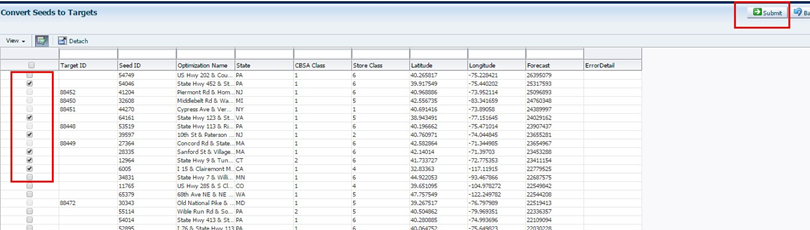
Check the box on the row(s) to convert and click Submit. A success message displays.

Note: Once the seeds are converted to Targets, they will appear on the Mapping Module. This process can take up to 4 hours.

Was this article helpful?

That’s Great!

Thank you for your feedback

Sorry! We couldn't be helpful

Thank you for your feedback

Let us know how can we improve this article!

Select at least one of the reasons
CAPTCHA verification is required.

Feedback sent

We appreciate your effort and will try to fix the article