Table of Contents
The Programs module in the system allows the user the ability to create and manage company level Programs for initiatives and remodels of existing stores. For an overview of the Program process, please refer to Programs and Existing Store Projects.
| Step | Action |
|---|---|
| 1. |
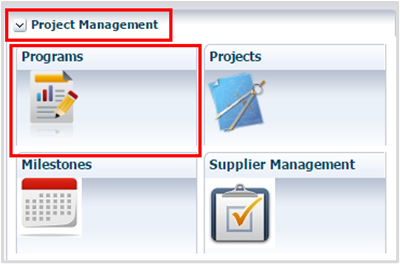
Navigate to the Functional Dashboard and click Programs.
|
| 2. |
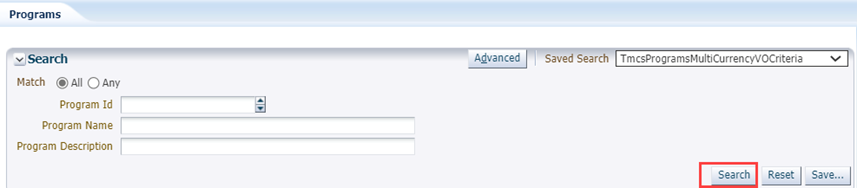
Click Search in the Search pane.
|
| 3. | Scroll to view the list of current programs in the Programs pane. |
| 4. |
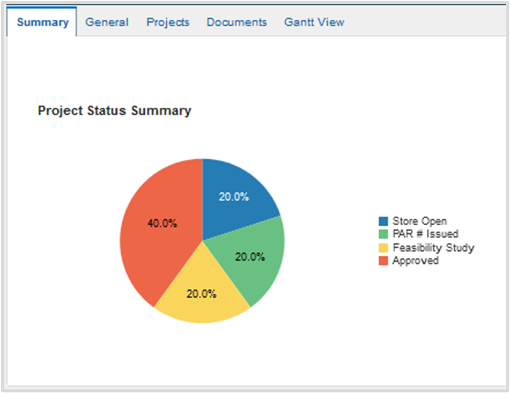
View the Summary pane.
|
Create a Program
| Step | Action |
|---|---|
| 1. |
Click Create Program.
|
| 2. |
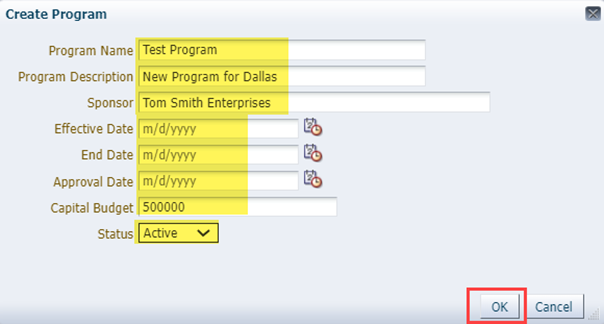
Complete the Create Program form, then click OK. Note: Fields may vary from depiction below. Fill out the form accurately and completely.
The new program displays in the program list. |

Edit a Program
| Step | Action |
|---|---|
| 1. |
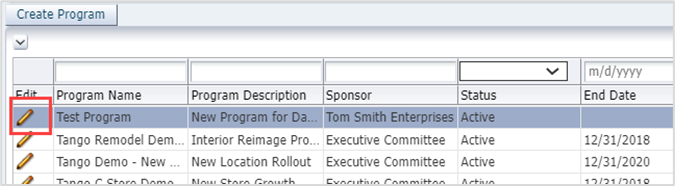
Click Edit on the Program row.
|
| 2. |
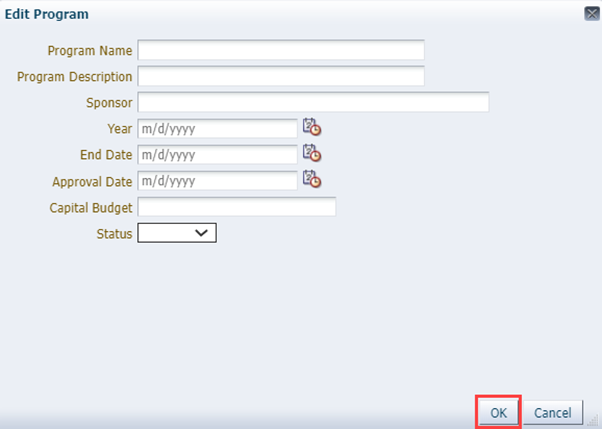
Edit any fields in the pop-up and click OK.
|
| 3. | Click Save. |
Was this article helpful?
That’s Great!
Thank you for your feedback
Sorry! We couldn't be helpful
Thank you for your feedback
Feedback sent
We appreciate your effort and will try to fix the article