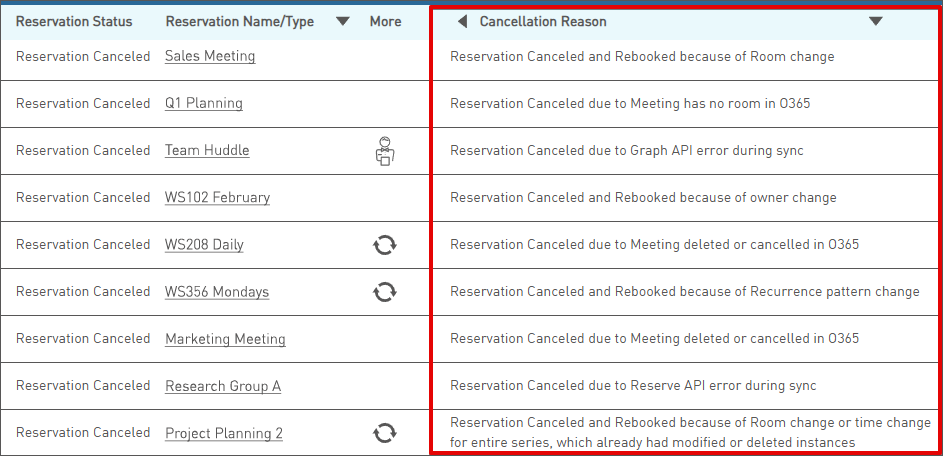
This enhancement provides visibility into why a given reservation was canceled. It was included in the February 13, 2026 release of Reserve. In Settings -> Reservations, a new column labeled "Cancellation Reason" appears at the right of the screen by default.
The Cancellation Reason column is populated when the reservation was canceled because of the Exchange Connector (Graph API), a Reserve API error, or there was a a cancel-rebook. The column can be collapsed. Cancellation reasons will be visible only for cancellations occurring February 14, 2026 and later. By request, Tango personnel can disable the reservations.cancellation.reasons.show property to hide the column completely.
Cancellation Reasons
- Reservation Canceled due to Graph API error during sync - This scenario applies to new reservations and modifications when a Graph API error occurs while trying to sync to O365.
- Reservation Canceled due to Reserve API error during sync - This scenario applies when the Reserve API is trying to sync an updated meeting to Reserve and an error occurs.
- Reservation Canceled due to Declined status of the room in O365 - This scenario applies when the room in the meeting has Declined status in O365.
- Reservation Canceled due to Meeting has no room in O365 - This scenario applies when there is no room in the meeting in O365.
- Reservation Canceled due to Meeting deleted or cancelled in O365 - This scenario applies to reservations within meetings which have been either deleted or cancelled in O365.
- Reservation Canceled and Rebooked because of Room change - This cancel-rebook occurred because the room was changed.
- Reservation Canceled and Rebooked because of Recurrence pattern change - This cancel-rebook occurred because the recurrence pattern changed.
- Reservation Canceled and Rebooked because of Room change or time change for entire series, which already had modified or deleted instances - This cancel-rebook occurred because the entire series already had some modified or deleted instances and then either the room or the time was changed.
- Reservation Canceled and Rebooked because of Recurring series changed to single day or single day changed to recurring series - This cancel-rebook occurred because the recurring series was changed to a single day meeting or vice versa.
- Reservation Canceled and Rebooked because of owner change - This cancel-rebook occurred because the reservation owner changed.
- Reservation canceled due to expired user access token (Direct Access configuration) - This scenario applies to organizations using the Direct Access configuration of the Exchange Connector. When the user's access token is expired, the reservation is canceled.
If the reservation has already started and the Exchange Connector encounters one of the scenarios above, it will check out the reservation. The reservation's status will become "Reservation is Checked Out." The cancel action is allowed only if the reservation has not started.
Cancellation Reason column in the Reservation table
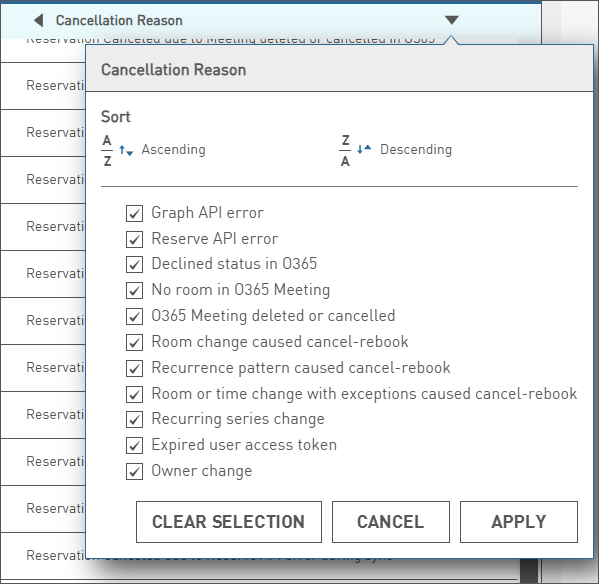
Filter for Cancellation Reason column
No Changes to the Reservation Status Column
The Reservation Status column will remain as is. Reservations which were canceled because they were bumped or manually canceled will not have a cancellation reason stated in the new column.
| Reservation Status | Scenarios which result in this reservation status |
| Reservation Canceled |
|
| Reservation Canceled by Administrator |
|
Activity Section
The cancellation reason also appears at the bottom of the reservation details screen. Expand the activity section, and if a cancellation reason exists, it will be visible in the action taken column regardless of whether the reservations.cancellation.reasons.show property is enabled or not. If a reservation is part of a series, you'll need to view the desired instance to see the cancellation reason.

Updated 2026-02-18
Was this article helpful?
That’s Great!
Thank you for your feedback
Sorry! We couldn't be helpful
Thank you for your feedback
Feedback sent
We appreciate your effort and will try to fix the article